This guide covers the useful NBN Atlas web services for pulling species information from the NBN Atlas. Species profile web services:
|
TABLE OF CONTENTS
Species search
The Species search web service allows you to search for a species, as you would search for a species on the NBN Atlas, i.e., https://species.nbnatlas.org
The web service
https://species-ws.nbnatlas.org/search?
Useful Parameters
| Parameter | Description |
| q | Query parameter – format query as FIELD:VALUE. For this web service, always use a catch all query, which means querying all fields and all values. Supply * for the FIELD and VALUE to return all fields and all values (i.e., q=*:*). |
| fq | Filter query parameter – format as FIELD:VALUE. Apply idxtype:TAXON to only return species information, as species-ws does not explicitly include species information. |
| facets | Filter query parameter – format as FIELD:VALUE. Apply idxtype:TAXON to only return species information, as species-ws does not explicitly include species information. |
| pageSize | Supply an integer value between 1 and 1000 to determine number of results returned for query (this does not affect the number of facet results returned), the default is 10. |
Download the attached Excel file for available fields to use.
Example uses
- Get species information for the common name, Atlantic Puffin:
https://species-ws.nbnatlas.org/search?q=*:*&fq=idxtype:TAXON&fq=commonName:“Atlantic Puffin”
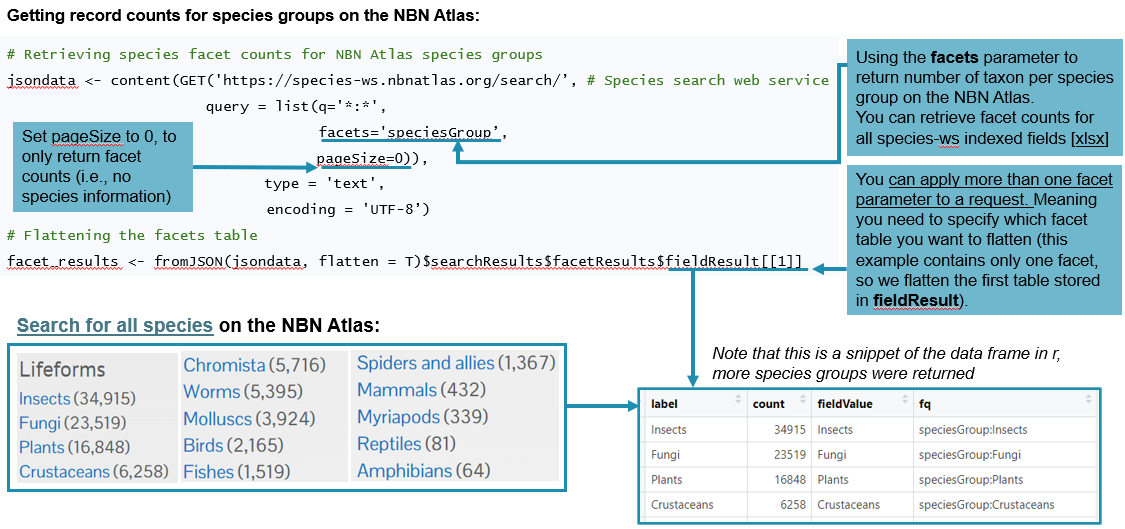
- Get facet counts for species groups used by the NBN Atlas (i.e., the number of species per species group)
https://species-ws.nbnatlas.org/search?q=*:*&fq=rank:“species”&facets=speciesGroup&pageSize=0
Example use cases with R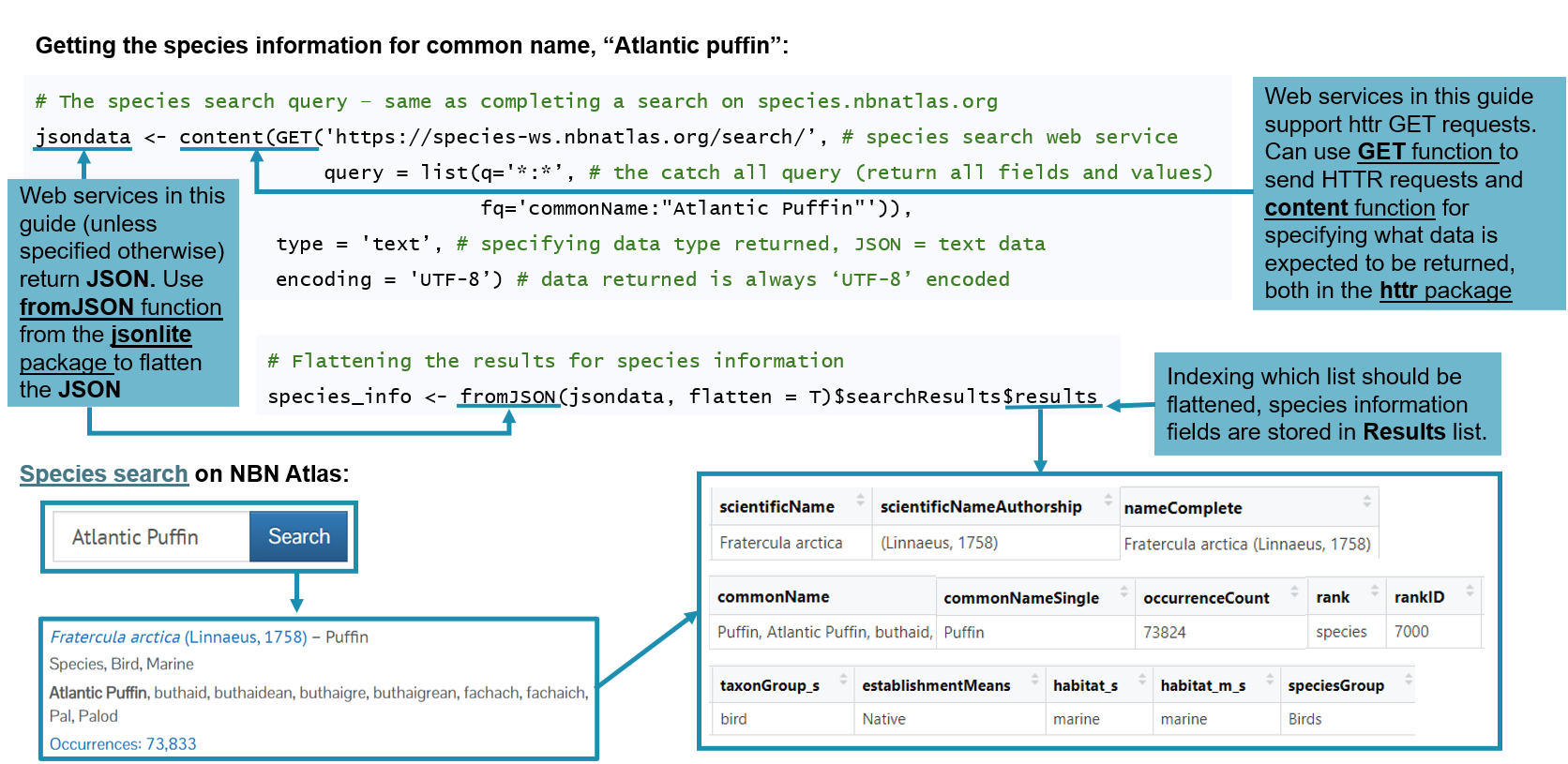
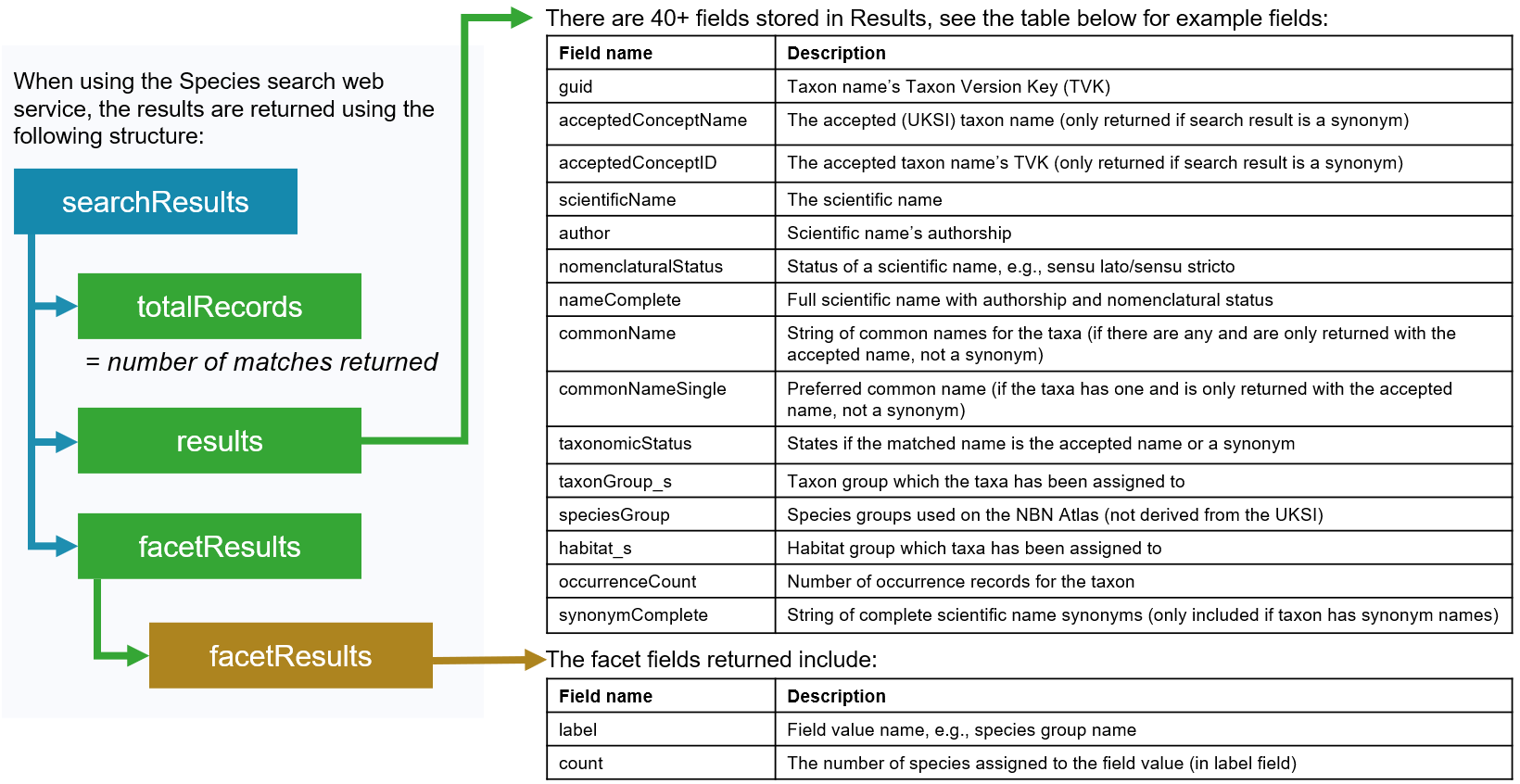
Data structure returned
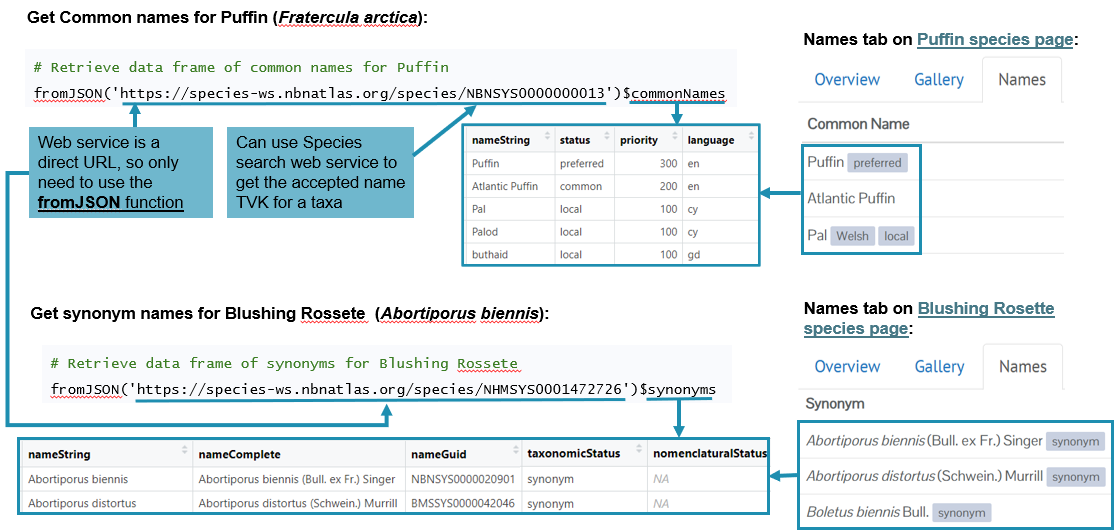
Species look up with GUID (TVK)
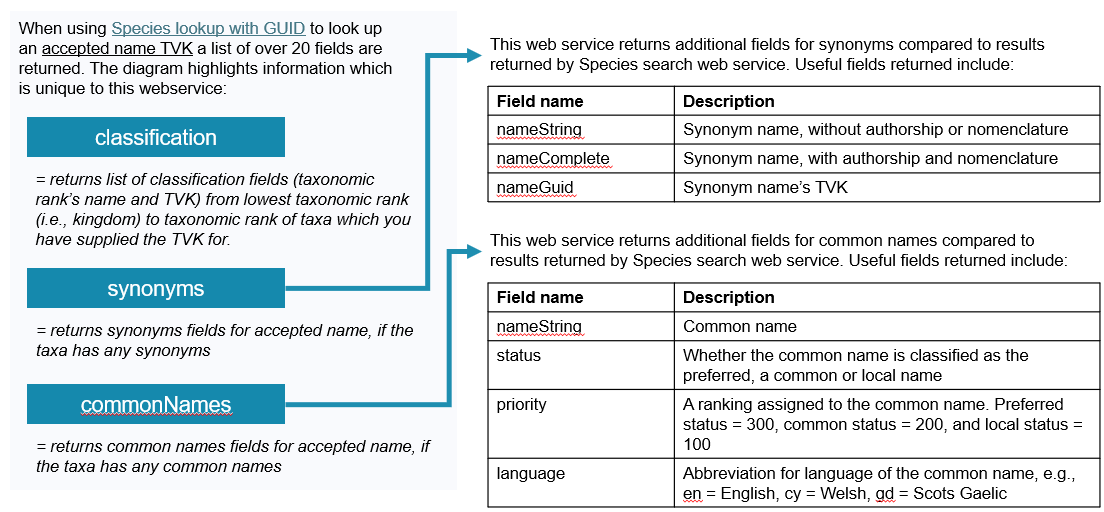
You can also retrieve species information using the Taxon Version Key for an accepted or synonym name, using the Species lookup with GUID web service. This web service returns information as stored on a species page on the NBN Atlas, e.g., https://species.nbnatlas.org/species/NBNSYS0000000013
The web service
https://species-ws.nbnatlas.org/species/{TVK}
Example use cases with R
Data structure returned
This web service returns similar fields to the Species search web service, with some additional fields included for taxa synonyms and common names. There over 20 fields returned, and the table below highlights some of those returned:
Species download
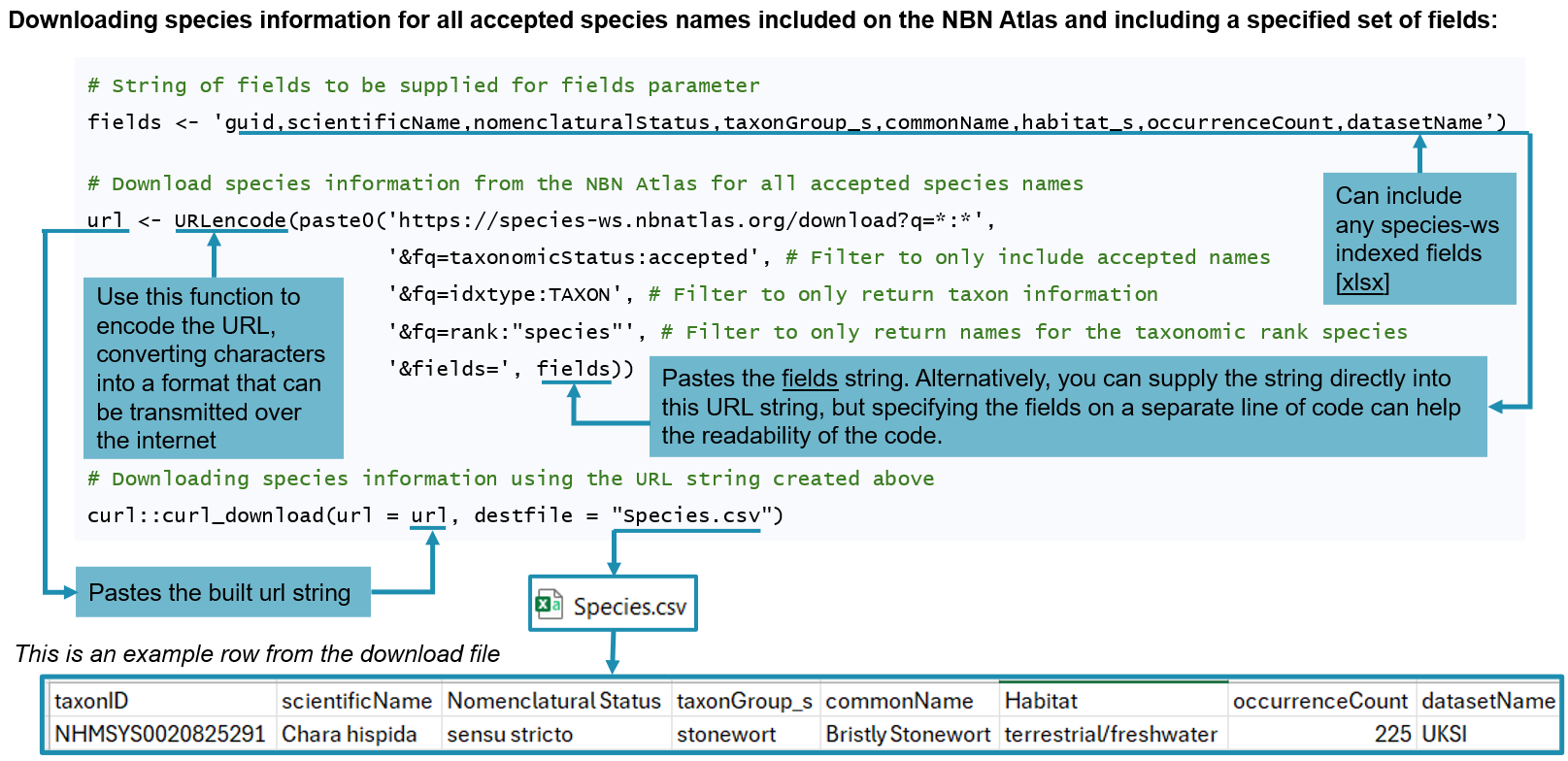
Species information can also be download using the API. The Species download web service allows you to download a CSV for species information. This replicates the behaviour when you complete a species search on the NBN Atlas and click the Download button:

The web service
https://species-ws.nbnatlas.org/download?
Useful parameters
| Parameter | Description |
| q | Query parameter – format query as FIELD:VALUE. For this web service, always use a catch all query, which means querying all fields and all values. Supply * for the FIELD and VALUE to return all fields and all values. |
| fq | Filter query parameter – format as FIELD:VALUE. Apply idxtype:TAXON to only return species information, as species-ws does not explicitly include species information. |
| file | Can specify a file name to use for the download (don’t include the file extension, i.e., ‘.csv’). Default file name is species |
| fields | You can supply a string of fields to be included, see species-ws indexed fields spreadsheet [xlsx] for fields you can include. If no fields are specified, the default fields are included: taxonConceptID, rank, scientificName, establishmentMeans, rk_genus, rk_family, rk_order, rk_class, rk_phylum, rk_kingdom, datasetName |
Example use
Download a list of accepted species name, with the default fields –
Example use cases with R
Was this article helpful?
That’s Great!
Thank you for your feedback
Sorry! We couldn't be helpful
Thank you for your feedback
Feedback sent
We appreciate your effort and will try to fix the article