The map can be downloaded in a variety of formats for print quality use in documents or to preview on the screen.
The ‘Download map’ is available as one of the Map Options in the Left Hand Side Legend Pane, and from the menu option Export Map.
Export Map
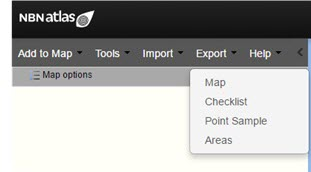
To export a map directly for previewing or download, on the menu select ‘Export’ and then ‘Map’.
A Download Map pop-up will appear
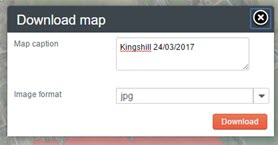
Enter a caption for the map; the date is included by default, but you can delete it.
The image formats are: jpg, pdf and png.
Then click on the ‘Download’ button and the image file will be automatically downloaded.
Was this article helpful?
That’s Great!
Thank you for your feedback
Sorry! We couldn't be helpful
Thank you for your feedback
Feedback sent
We appreciate your effort and will try to fix the article