This page is for data partners and describes the advised workflow for managing access for NBN Atlas users to records affected by Access Controls (i.e., records which have been shared with a set public resolution or sensitive species records).
Glossary
Resolution – The spatial uncertainty of a record based on the grid reference or coordinate uncertainty in meters. See Spatial resolutions guide for guidance on spatial resolution information on the NBN Atlas. Public resolution – The coordinate uncertainty or grid square size that the record is viewable at on the NBN Atlas. For set public resolution datasets this will be 1, 2, 5 or 10km grids. Sensitive species – When a record is for a species deemed sensitive in a specified country according to the sensitive species lists. The record is then subject to the generalisation specified in the relevant list. Supplied resolution – The coordinate uncertainty or grid square size as supplied by the data partner in the original datafile. Location – Refers to the grid reference, latitude and longitude coordinates, coordinate-uncertainty and the locality text for a record. Generalised – When the supplied resolution is higher than the resolution displayed on the NBN Atlas. |
What records can data partner manage access to on the NBN Atlas
If you (a data partner) have shared sensitive species records or have a public resolution data resource on the NBN Atlas, NBN Atlas users may contact you to request access to the supplied location information.
Those wanted to request access to the supplied location information have been advised to complete the Request access to supplied resolution form (attached this guide). The guide asks for the following information:
- What is the requester’s purpose for using the records? They should provide a short explanation of how they intend to use these records, to help you decide if you are happy to grant them access.
- Is the requester interested in certain taxa? If so, they should supply a list of the scientific names. If they are only interested in species classified as sensitive (see sensitive species lists), they can specify this, rather than supplying a list.
- Is the requester only interested in using records in a specific dataset/s you have supplied? If so, they should supply the name/s of the dataset/s.
- Does the requester only require records for a specified country, Watsonian Vice County, or Local Environmental Records Centre? If so, they should specify what country (England, Wales, Scotland, Isle of Man, or Northern Ireland), vice county, or Local Environmental Records Centre. More than one area can be specified.
- Does the requester only want records for a specified year or year range? If so, they should specify which years.
- The email address for requester’s registered NBN Atlas account, which they will use to access the Access Controlled data.
The requester should share a completed Request access to supplied resolution form when contacting you. If the requester does not provide sufficient information to answer the criteria above, then you should share the Request access to supplied resolution form (attached to this guide). Knowing the information above can help simplify the process of specifying access to a NBN Atlas user.
Managing access to the supplied location
When you are ready to give access to the NBN Atlas user for the access controlled records, navigate to your data partner page on the NBN Atlas. You can navigate to your data partner page by clicking on the Data and partners tab (present in the banner of all NBN Atlas pages), and clicking on 'Search for a Data Partner'.
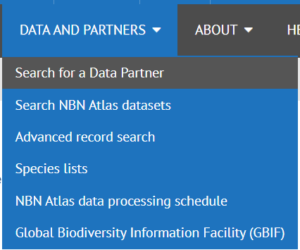
Click on the List tab, then search for and click on your data partner name in the list. This will take you to your data partner page.
Click on the Edit button (located at the top of the page).
NOTE: If this button is not visible to you, this means you have not been set up to manage access. Please contact us by submitting a ticket.
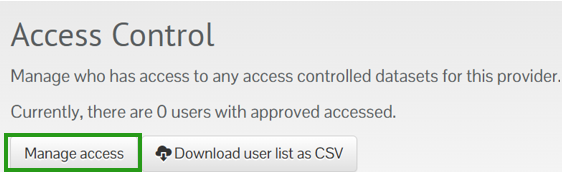
Scroll down to the Access Control section and click the 'Manage Access' button.
Type the NBN Atlas user’s email in the 'Find registered user by email address' search box and click the enter key on your keyboard. If there is an NBN Atlas account associated with the email, the match will show automatically in 'Search Results' panel below.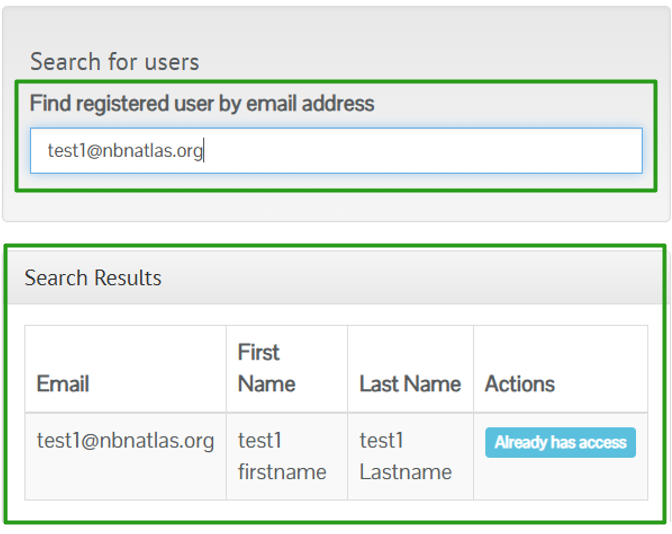
If access has not been granted you will need to click the 'Grant access' button. If the user already has access you will need to find them in the Approved users table. If no match is returned, then you will need to go back to the requester to check if the supplied email address is correct.
When you have granted access to the user they will appear in the 'Approved Users' table. Click the 'Specify access' button for the NBN Atlas user.

From here you can also revoke access to a NBN Atlas user, by finding the user in the table and clicking the 'Revoke access' button.

To specify the records you want the user to have access to click on the 'Add filter' button.
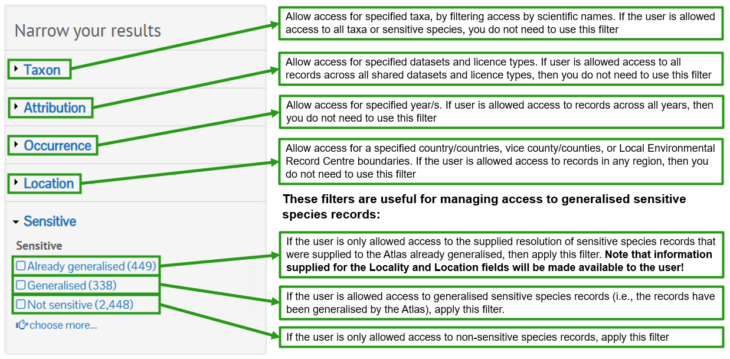
Using the information provided by the requester, apply the filters on the 'Narrow your results' panel to allow access to the supplied resolution for specified records.
Alternatively, if you want the user to have access to the supplied location information for all of your records simple apply no filters and click the 'Save' button.
The NBN Atlas user will now have access to the supplied resolution for the records you have specified. To access the supplied resolutions, the user will need to download the records in the Simple Spreadsheet format. Records will still be generalised for the NBN Atlas user, when viewing them on the NBN Atlas.
Was this article helpful?
That’s Great!
Thank you for your feedback
Sorry! We couldn't be helpful
Thank you for your feedback
Feedback sent
We appreciate your effort and will try to fix the article