This page is for NBN Atlas users and describes the advised workflow for requesting access to the supplied resolution for a record’s location on the NBN Atlas (Access Controlled records). This includes records in datasets with a set public resolution and sensitive species records.
TABLE OF CONTENTS
- Glossary
- Identify the generalised records
- Find the data partner contact information
- Contact the data partner
- Accessing supplied location information
Glossary
Resolution – The spatial uncertainty of a record based on the grid reference or coordinate uncertainty in meters. See Spatial resolutions guide for guidance on spatial resolution information on the NBN Atlas. Public resolution – The coordinate uncertainty or grid square size that the record is viewable at on the NBN Atlas. For set public resolution datasets this will be 1, 2, 5 or 10km grids. Sensitive species – When a record is for a species deemed sensitive in a specified country according to the sensitive species lists. The record is then subject to the generalisation specified in the relevant list. Supplied resolution – The coordinate uncertainty or grid square size as supplied by the data partner in the original datafile. Location – Refers to the grid reference, latitude and longitude coordinates, coordinate-uncertainty and the locality text for a record. Generalised – When the supplied resolution is higher than the resolution displayed on the NBN Atlas. |
Identify the generalised records
You will need to identify the data partners which have shared records at a higher resolution than displayed on the NBN Atlas (i.e., shared datasets with a set public resolution or records of sensitive species).
There are several ways to identify is a record is affected by a sensitive generalisation or public resolution on the NBN Atlas. If you want to request access to the supplied resolution for a single record you can can find the data partner contact information on the NBN Atlas.
If you want to use several records, e.g., you want to use all records within a searched area, the easiest way to identify records which have been generalised is by downloading the records in the simple spreadsheet format.
The downloaded records will include a Generalised status column. See the table below for the text which may be displayed in the column and what it means.
| Text | Meaning |
| There is no higher resolution location information available via the NBN Atlas. | You may want to contact the data partner still as they may hold more location information for the record in their own database. But the record has not been generalised by the NBN Atlas. |
| Location information has been generalised. Please contact the data partner. | The location information has been generalised, either because the record is sensitive or the record has a public resolution. Use the 'Sensitive status' column to check is the record is sensitive, and the 'Public resolution (m)2' column for if the record has a set public resolution. |
| Access granted to highest resolution location information. | You have been granted access to the supplied location information on the NBN Atlas for the record. |
Find the data partner contact information
Once you have identified the records you want to request access to the supplied location information, use the 'Data provider' column source the data partner name.
You will then need to find the data partner contact information on the NBN Atlas. You can find a data partner’s contact email on their data partner page. To navigate to a data partner page, click on the Data and Partners tab (located at the top of all NBN Atlas pages) and then click 'Search for a Data Partner'.
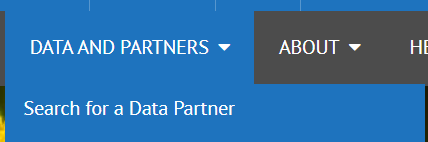
Find the relevant data partner/s using the Map or List tab, and see the contact information included on their page. From the data partner page, you can also access the data resource pages. For some data providers, the contact differs across their datasets, so it is best to check for this.
Contact the data partner
Complete the Request access to supplied resolution form (attached this guide). This form will help collate the information the data partner will need from you to decide if they want to give you access and to manage your access to the supplied resolution on the NBN Atlas.
Email the data partner/s and included the completed form.
Accessing supplied location information
If the data partner accepts your request to the supplied resolution, they will then manage access to your NBN Atlas account. Once they have confirmed that this is complete, you will need to download the records to access the supplied resolution for the records’ location (this information is not currently available to view on the NBN Atlas, regardless of whether access has been granted to your NBN Atlas account or not).
You will need to download the records in the Simple Spreadsheet format.
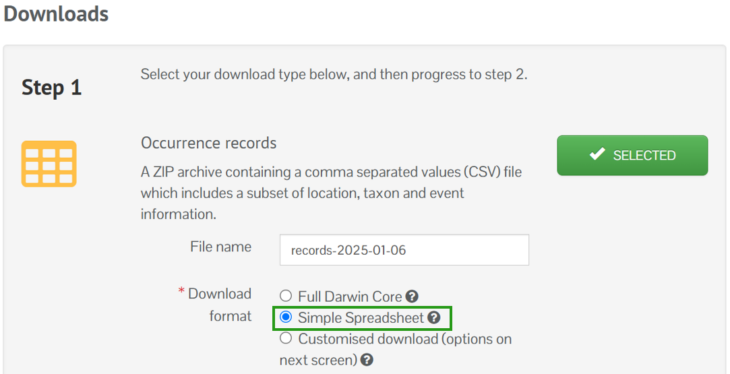
For records which you have been allowed access for (use the Generalised status to identify these records if required), the supplied resolution location is stored in bespoke columns in your download.

For records which are not affected by Access Controls or you have not been allowed access to, the access controlled columns will be blank.
Was this article helpful?
That’s Great!
Thank you for your feedback
Sorry! We couldn't be helpful
Thank you for your feedback
Feedback sent
We appreciate your effort and will try to fix the article